iOS Jailbreak Detection Bypass Using LLDB
 First, I’d like to point out that this lab can be solved using easier approaches such as Frida scripts or patching the Mach‑O binary and reinstalling the modified application. However, I challenged myself to solve it in a different way—specifically using low‑level debugging with LLDB on a real device.
This approach helps deepen understanding of ARM64 architecture, return values, and runtime behavior, so let’s get started.
Prerequisite Tools
On your machine:
- A disassembler such as Ghidra, Hopper, or IDA
- LLDB
On your iPhone:
- debugserver (LLDB)
- SSH for remote connection
Application Behavior
After downloading the lab files and installing the IPA on the device, let’s observe the application behavior:
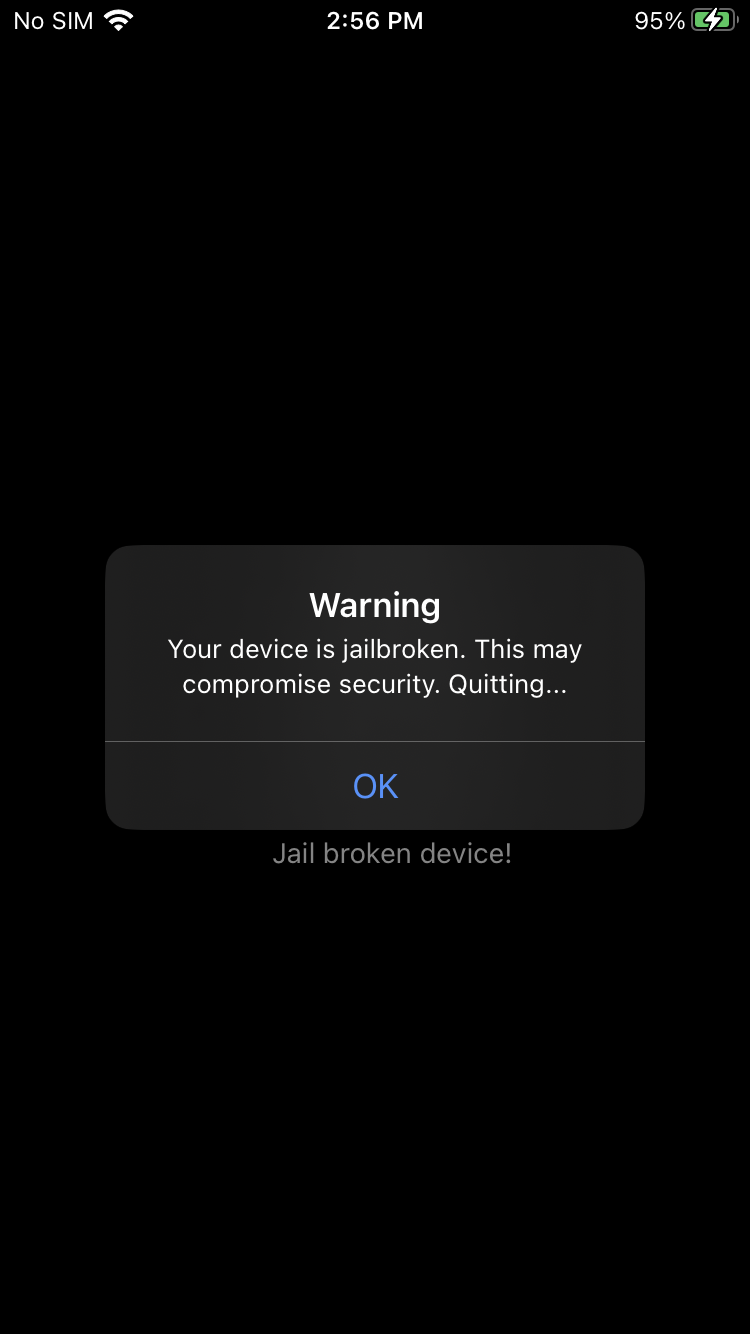
As we can see, the app displays a simple screen indicating that the device is jailbroken. When pressing the OK button, the application exits.
Static Analysis (Ghidra)
Now we will analyze the Mach-O binary using Ghidra. Since this is a jailbreak detection challenge, it makes sense that the responsible function contains the word “jailbreak”. Using Ghidra, we search for relevant symbols:
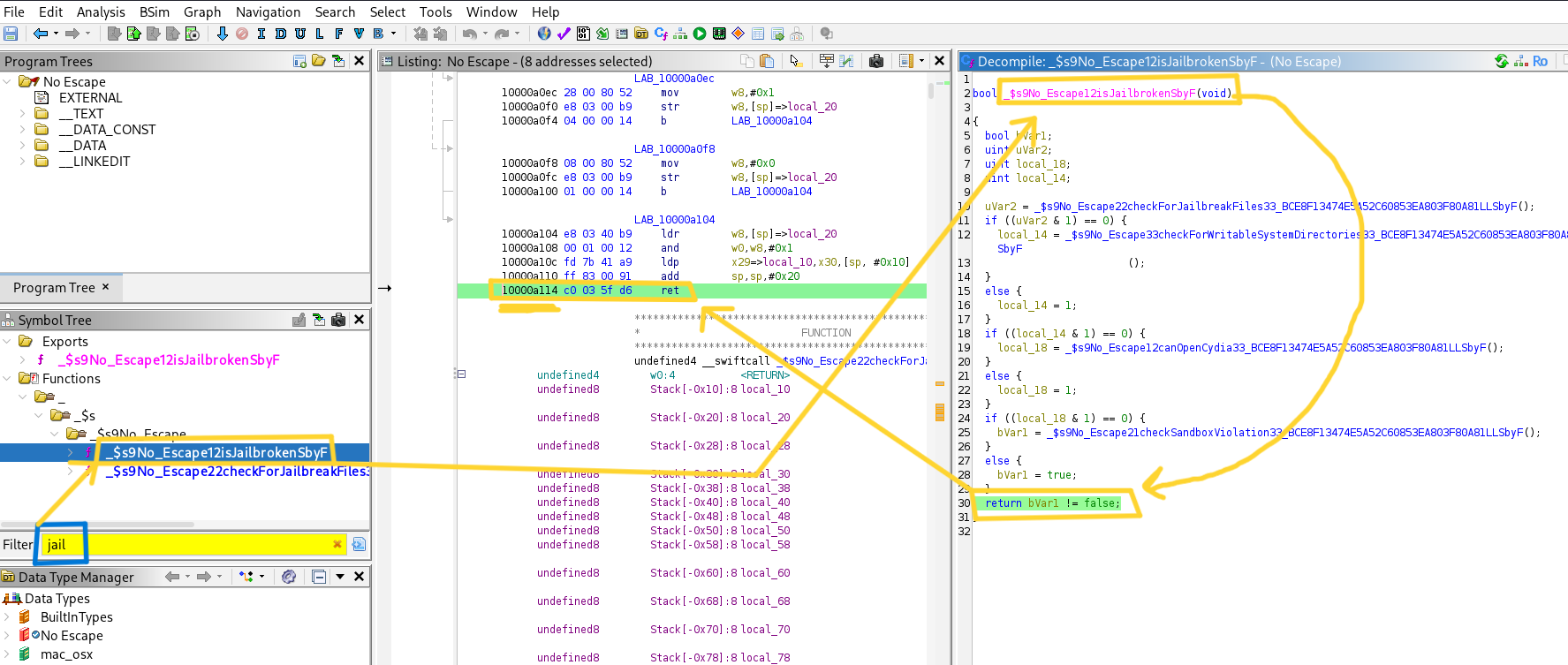
We find this function named isJailbroken: _$s9No_Escape12isJailbrokenSbyF So this is the function we will focus on.
Understanding the Logic
By analyzing the function, we see that it calls four different jailbreak checks. Conceptually, the function can be simplified as follows:
1
2
3
4
5
6
bool isJailbroken() {
    return checkForJailbreakFiles()
        || checkForWritableSystemDirectories()
        || canOpenCydia()
        || checkSandboxViolation();
}
This is a Boolean OR chain—if any check returns true, the device is considered jailbroken. Our goal is to force this function to return false at runtime using a debugger.
Dynamic Analysis with LLDB
1. Start debugserver
Start debugserver on the iPhone using: debugserver <machineIP>:4444 --waitfor="No Escape"
Launch the app on the device. It will appear stuck on a black screen, which is expected. A connection will be received by debugserver.
1
2
3
iPhone:/ root# debugserver 192.168.1.6:4444
debugserver-@(#)PROGRAM:LLDB  PROJECT:lldb-16.0.0 for arm64.
Listening to port 4444 for a connection from 192.168.1.6...
2. Connect LLDB
On the machine, attach the process to LLDB using: process connect connect://<iPhoneIP>:4444
Handling ASLR
Because iOS uses Address Space Layout Randomization (ASLR), we must calculate the runtime address of the ret instruction.
Calculate the Runtime Address
- List the image base address:
image list -o -f "No Escape"1 2 3 4
(lldb) process connect connect://192.168.1.11:4444 Process 3156 stopped and restarted: thread 1 received signal: SIGCHLD (lldb) image list -o -f "No Escape" [ 0] 0x0000000002674000 /../No Escape.app/No Escape(0x0000000102674000)
So, we can see the image base address is
0x102674000. - From Ghidra, the offset of the
retinstruction is0xa114as shown below:1 2 3 4 5 6
LAB_10000a104 10000a104 e8 03 40 b9 ldr w8,[sp]=>local_20 10000a108 00 01 00 12 and w0,w8,#0x1 10000a10c fd 7b 41 a9 ldp x29=>local_10,x30,[sp, #0x10] 10000a110 ff 83 00 91 add sp,sp,#0x20 10000a114 c0 03 5f d6 ret // Note Here
The runtime address becomes: 0x102674000 + 0xa114 = 0x10267e114
Setting the Breakpoint
First, we confirm the instruction address using dis -s 0x10267e114.
1
2
3
4
5
6
7
8
9
10
11
12
(lldb) dis -s 0x10267e114
No Escape$s9No_Escape12isJailbrokenSbyF:
0x10267e114 <+172>: ret // Note Here

No Escape$s9No_Escape22checkForJailbreakFiles33_03F80A81LLSbyF:
0x10267e118 <+0>: sub sp, sp, #0xf0
0x10267e11c <+4>: stp x20, x19, [sp, #0xd0]
0x10267e120 <+8>: stp x29, x30, [sp, #0xe0]
0x10267e124 <+12>: add x29, sp, #0xe0
0x10267e128 <+16>: stur xzr, [x29, #-0x18]
0x10267e12c <+20>: sub x8, x29, #0x28
0x10267e130 <+24>: stur x8, [x29, #-0x60]
It works fine; then set a breakpoint and continue execution:
1
2
(lldb) breakpoint set -a 0x10267e114
(lldb) c
After a short wait, the breakpoint is triggered:
1
2
3
4
5
6
7
8
9
10
11
12
13
(lldb) breakpoint set -a 0x10267e114
Breakpoint 1: where = No Escape`$s9No_Escape12isJailbrokenSbyF + 172, address = 0x000000010267e114
(lldb) c
Process 3156 stopped
* thread #1, queue = 'com.apple.main-thread', stop reason = breakpoint 1.1
    frame #0: 0x000000010267e114 No Escape`$s9No_Escape12isJailbrokenSbyF + 172
No Escape`$s9No_Escape12isJailbrokenSbyF:
->  0x10267e114 <+172>: ret  // Note Here

No Escape`$s9No_Escape22checkForJailbreakFiles33_BCE8F13474E5A52C60853EA803F80A81LLSbyF:
    0x10267e118 <+0>:   sub    sp, sp, #0xf0
    0x10267e11c <+4>:   stp    x20, x19, [sp, #0xd0]
    0x10267e120 <+8>:   stp    x29, x30, [sp, #0xe0]
Modifying the Return Value
Reading the registers:
1
2
3
4
5
6
7
8
9
10
11
12
13
14
15
16
17
18
(lldb) register read
General Purpose Registers:
        x0 = 0x0000000000000001
        x1 = 0x0000000000000000
        x2 = 0x0000000000000000
        x3 = 0x000000028135e140
                ........
       x23 = 0x0000000000000001
       x24 = 0x0000000000000000
       x25 = 0x00000001ed176000  (void *)0x00000001f210ca18: UIAnimatablePropertyBase + 160
       x26 = 0x00000001ed18c000  UIKitCore`UIPeripheralHost._interfaceAutorotationDisabled + 5052
       x27 = 0x000000002b870064
       x28 = 0x0000000000000010
        fp = 0x000000016d78ad10
        lr = 0x000000010267a970  No Escape`$s9No_Escape11AppDelegateC11application_29didFinishLaunchingWithOptionsSbSo13UIApplicationC_SDySo0k6LaunchJ3KeyaypGSgtF + 48
        sp = 0x000000016d78acd0
        pc = 0x000000010267e114  No Escape`$s9No_Escape12isJailbrokenSbyF + 172
      cpsr = 0x60000000
Note: On ARM64, the return value of a function is stored in the x0 register.
You’ll notice that x0 = 1. A value of 1 means the function is returning true (jailbroken). To bypass the detection, overwrite the return value to 0 (false).
1
2
3
(lldb) register write x0 0
(lldb) c
Process 3156 resuming
Result
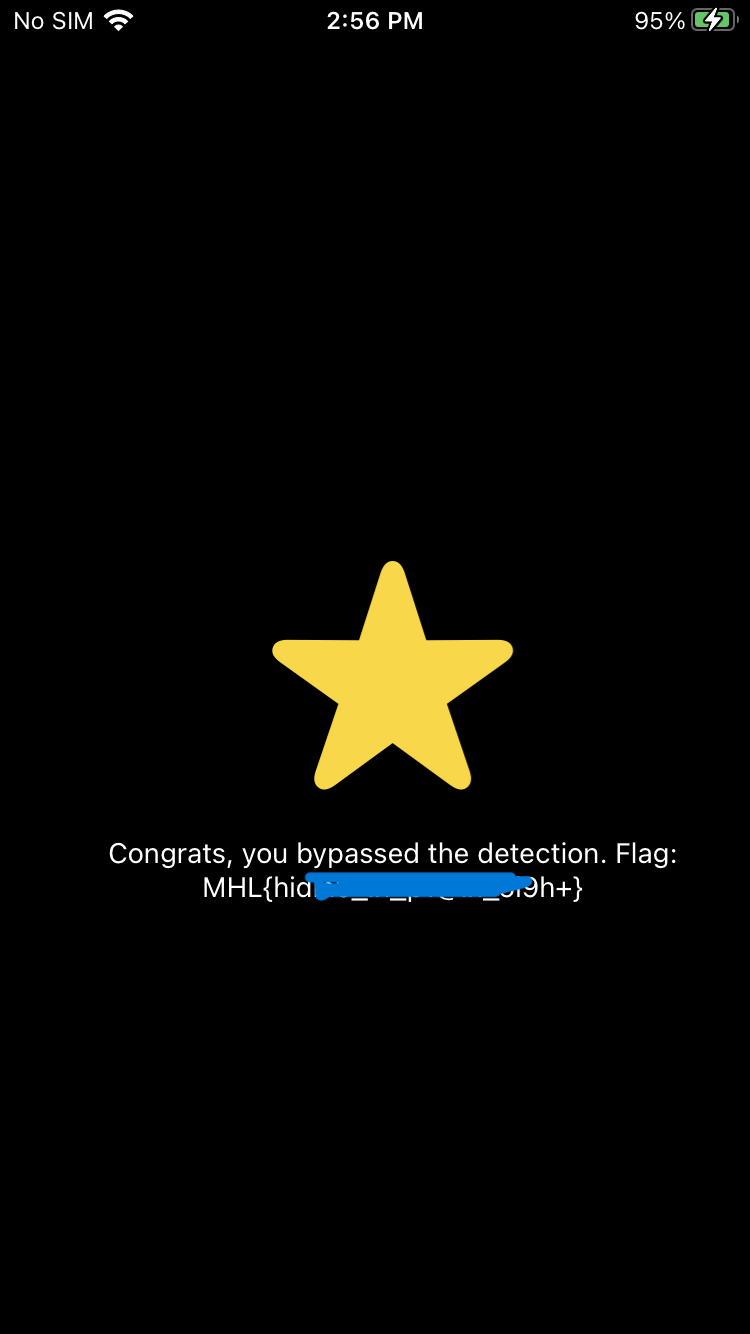
After continuing execution, the jailbreak detection is successfully bypassed at runtime, and the application proceeds normally, revealing the flag:
Final Notes
- This method does not modify the binary.
- It demonstrates how understanding ARM64 calling conventions enables powerful runtime analysis.
- The same approach applies to many jailbreak detection implementations.
THANKS FOR READING ❤️